Building a high-performance real estate presence in Canada has historically been a struggle between high cost and high complexity. In 2025, the game has changed. This guide serves as a practical, step-by-step manual for RealtyChat.ca, the platform replacing traditional websites with intelligent, shareable listing hubs.
Step 1: Sign-Up and Claim Your Hub
The first step is to visit RealtyChat.ca and click the 'Get Started' button. You can sign up instantly using your Google account. This process creates your private dashboard where all your real estate data, listings, and leads will be managed securely.
Step 2: Create Your First Listing
Once logged in, navigate to your Agent Dashboard and click on 'Create Listing'. Our intuitive 6-step wizard will guide you through the process:
- Address Input: Enter the property address—our system uses Google Places to pull geographic data automatically.
- Core Specs: Define the price, bedrooms, bathrooms, square footage, and property type.
- Media & Documents: Upload high-resolution property photos and attach essential PDF documents like floor plans or feature sheets.
- Profile Sync: Ensure your contact details and social media links are up to date so they appear on the final page.
Step 3: Power Up with AI Insights
This is the most critical step for your website's performance. Click 'Generate AI Insights' in the listing editor. Our AI engine scans the exact coordinates of your property to identify nearby schools, transit, and amenities. This creates a professional, location-aware description that builds trust with buyers. Note: Generating insights is required to unlock the sharing features for your listing.
Step 4: Share Your Listings & Master Link Hub
With your insights generated, you can now publish your property. You have two primary ways to share your new website:
- Individual Listing Links: Click the share icon on any property to get a unique URL. This is perfect for targeted marketing or sending directly to buyers via WhatsApp or DM.
- The Master Link Hub: In the dashboard, click 'Get Shareable Link' to create your custom agent slug (e.g.,
realtychat.ca / agent / yourname). This link is the 'Super App' for your business, combining your entire digital presence into one high-converting destination.
Master Link Core Features:
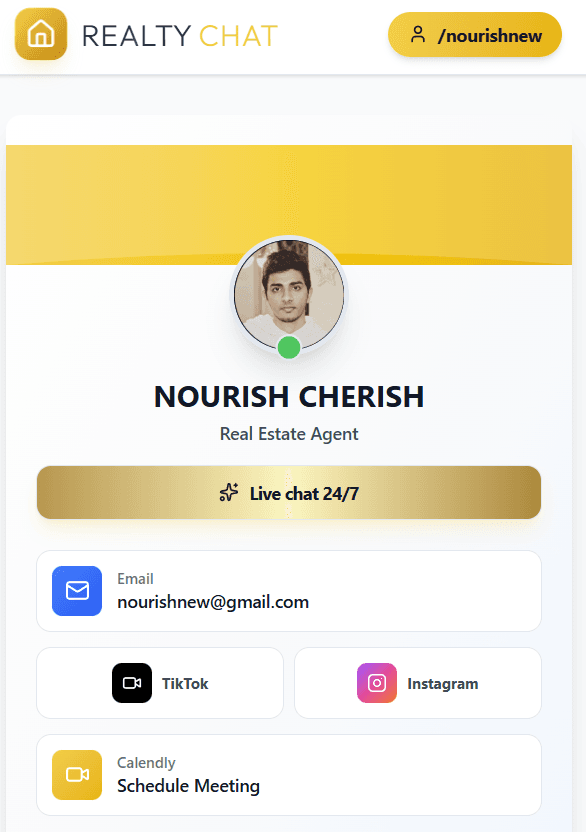
- Professional Identity & Branding: Your Master Link features a high-end, branded navbar with your personal slug badge, headshot, and a pulse animation showing you are active and available to help.
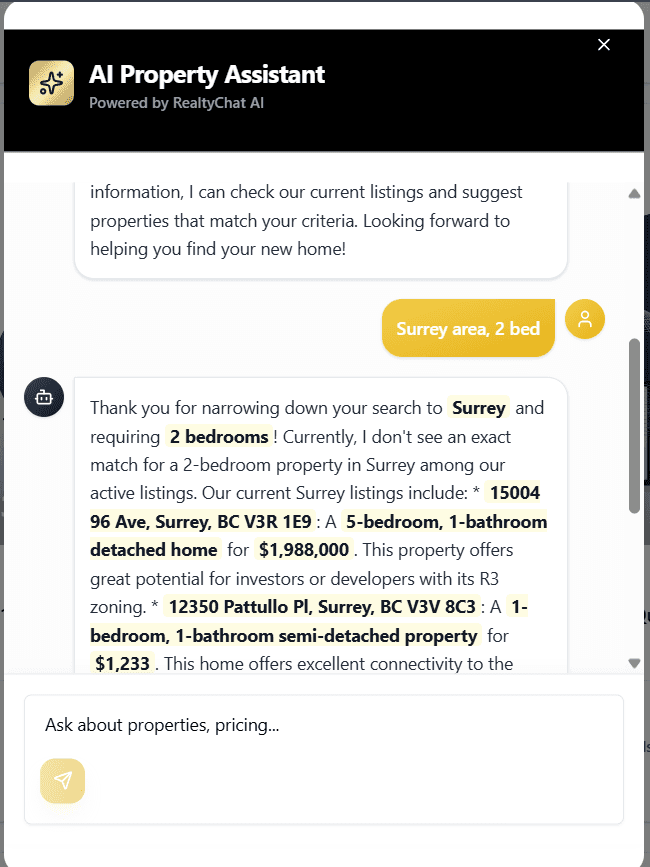
- 24/7 AI Live Chat Assistant: A prominent 'Live Chat 24/7' button allows buyers to engage with your 'Digital Twin' immediately. The AI knows your listings and qualifies leads while you sleep.
- One-Tap Contact Suite: Integrated buttons for direct 1-tap Email, Phone, and WhatsApp. No more 'link in bio' dead ends.
- Social Media Synergy: Beautifully integrated links for your TikTok and Instagram profiles, allowing buyers to follow your brand across platforms.
- Calendly Booking: Embed your scheduling link directly so serious buyers can book a viewing or consultation with one tap.
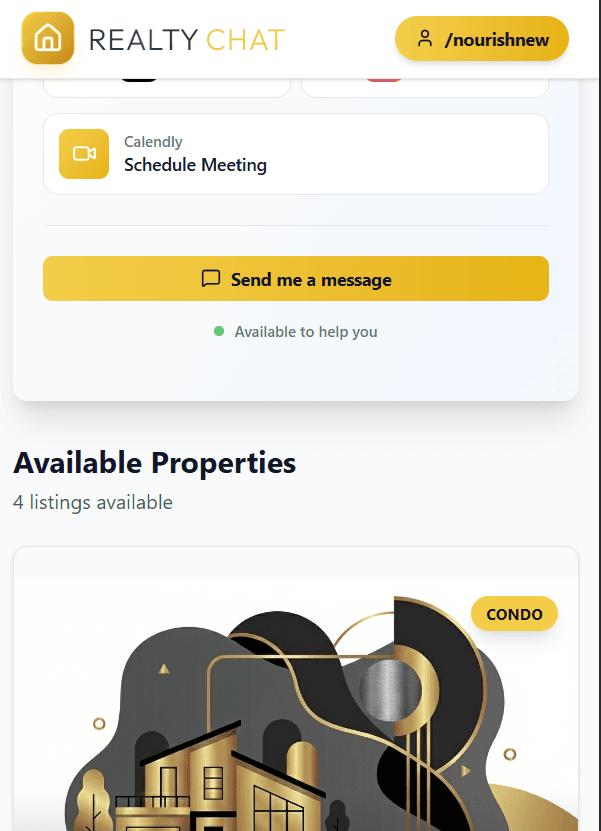
- Automated Property Gallery: Every listing you set to 'Published' automatically appears in a clean, visual grid on your Master Link. No manual website updates required—your inventory stays in perfect sync.
Step 5: Monitor Leads in Real-Time
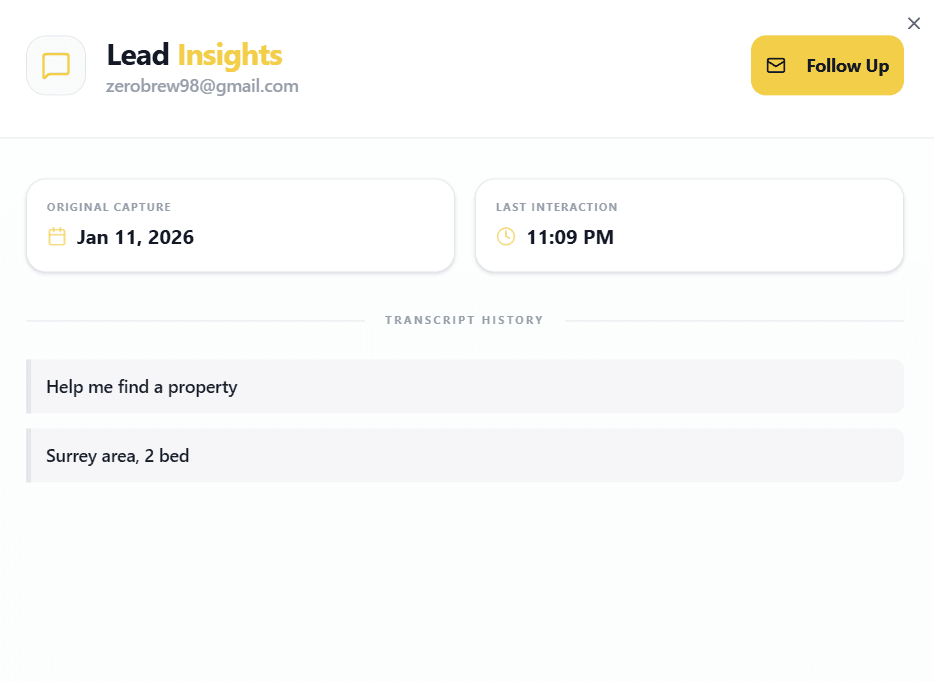
Your work doesn't stop after sharing. Every page includes a 24/7 AI chatbot that engages visitors and captures their contact information and requirements. To view your growing pipeline, visit the AI Leads page in your dashboard. You'll find full transcripts of every conversation, allowing you to follow up with leads who are truly ready to buy.
Conclusion
The Hidden Cost of "Old School" Websites
Maintaining a custom real estate website is notoriously expensive and time-consuming. You are often paying developers thousands of dollars upfront, plus monthly retainer fees, just to keep the lights on.
The Trap
This is where RealtyChat changes the game. It solves these headaches by letting agents manage their own listings instantly without writing a single line of code.
"RealtyChat gives you a personalized, AI-powered link to share with buyers—eliminating the need for expensive hosting while delivering features that actually convert."
1. The "Master Link" (Link-in-Bio)
Replace your fragmented social presence with one elegant Master Link. It hosts all your listings, your "Contact Agent" button, Calendly booking link, and direct icons for TikTok, Instagram, and Facebook. It's the only link you'll ever need in your bio.
2. AI Listing Assistant (The Location Expert)
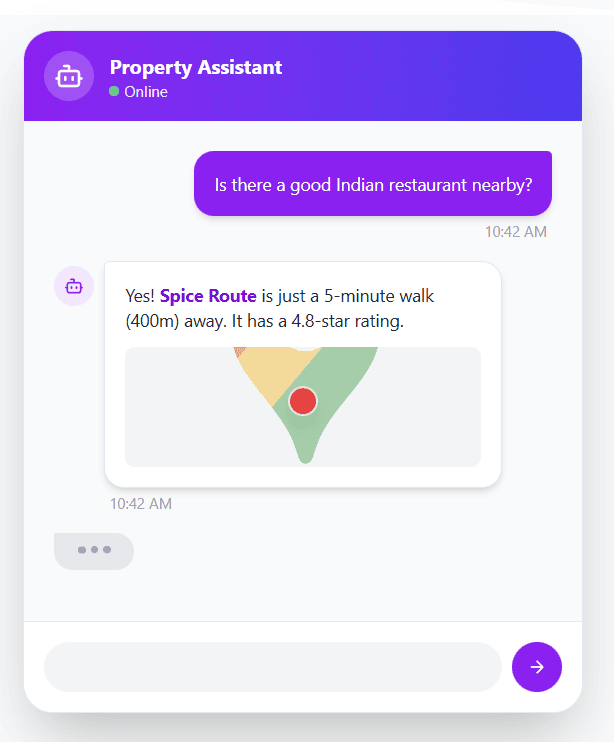
Every individual listing comes with a dedicated Location Expert AI. Powered by Google Maps and Gemini, it uses the property address to answer hyper-local questions with surgical precision. Buyers can ask "Where are the nearest Asian restaurants?", "How far is the gym?", or about local schools, getting accurate, real-world data instantly.
3. Lead AI Chatbot (Your Digital Twin)
Located on your Master Link-in-Bio, this chatbot acts as your digital twin. You can configure it with your own knowledge base (PDFs, text files) to represent your brand 24/7. It greets visitors, collects lead requirements automatically, and proactively recommends listings from your entire portfolio that match their needs.
4. AI Leads Dashboard
Stop guessing who is visiting your links. Your AI Leads Page gives you a real-time view of every lead captured by your Link-in-Bio chatbot. View their email, property requirements, and the full conversation history so you can step in when they're ready to talk.
5. Neighborhood & Lifestyle Intelligence
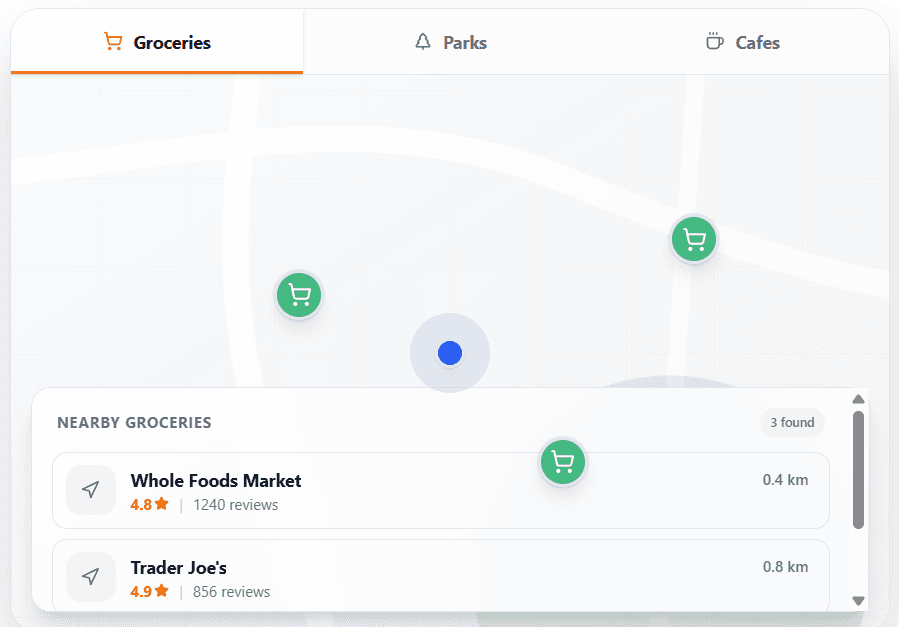
Our platform leverages Google's Gemini AI combined with Google Maps data to create rich, location-aware listing descriptions, automatic commute analysis, and interactive lifestyle maps for every listing.
Instant Neighborhood Analysis:
- ✓Commute Analysis: Instant drive vs. transit times to major work hubs.
- ✓Lifestyle Maps: Auto-populated maps with nearby grocery stores, parks, and schools.
- ✓AI Descriptions: Compelling narratives with precise walking distances to local cafes and gyms.
Start Now
Ready to Upgrade Your Real Estate Business?
Join thousands of agents who are saving time and closing more deals with RealtyChat's AI-powered tools and beautiful link-in-bio listings.
Subscribe to our newsletter
Get the latest real estate market analysis and trends delivered straight to your inbox.